Only users with Administrative permissions can manage other users within the account.
Adding a New User
To add a new user:
Click your name in the upper-right corner of Aegis.
Select Users from the dropdown menu.
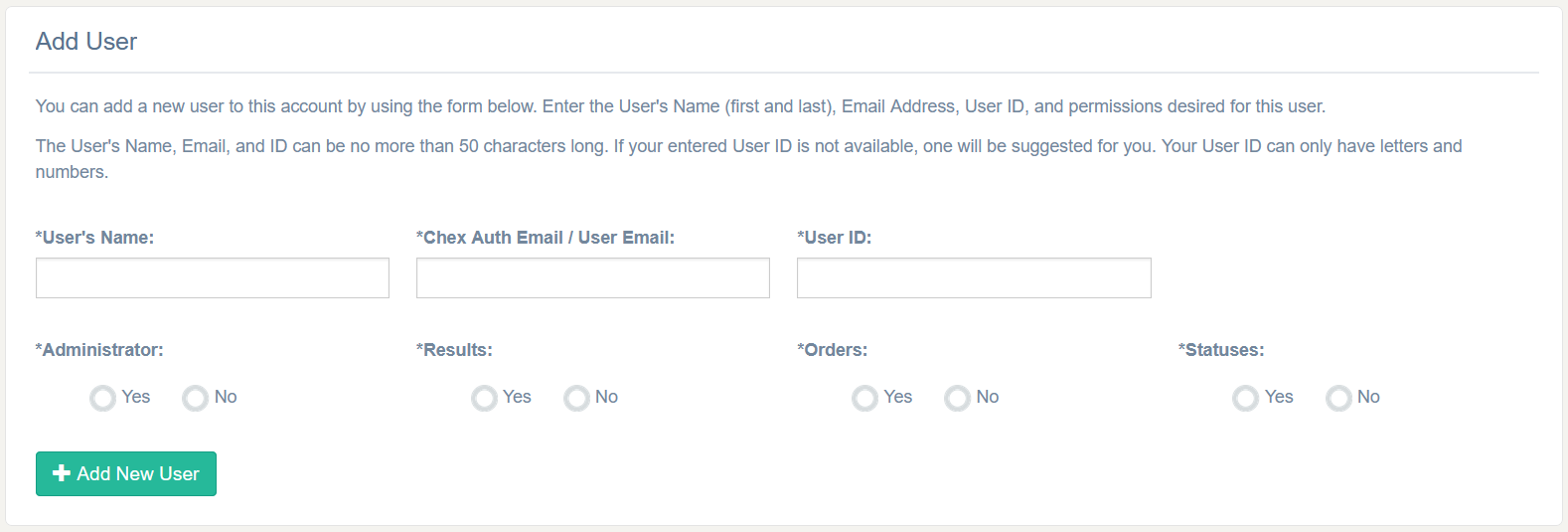
At the top of the page, click the option to Add User.
Complete all required fields.
User Name (e.g., Mary Smith)
Email Address (e.g., mary.smith@company.com)
User ID (e.g., msmith25)
⚠️ Important: User information must be entered accurately. Once created, user details cannot be edited without assistance from Bchex Client Services.
Sending User Credentials
After adding a user, be sure to send their login credentials:
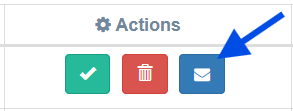
Click the blue icon next to the user’s name to send their credentials.
If you need further assistance, you may send a written request to clientservices@bchex.io with the name and email of the user. Please include their account permission requirements:
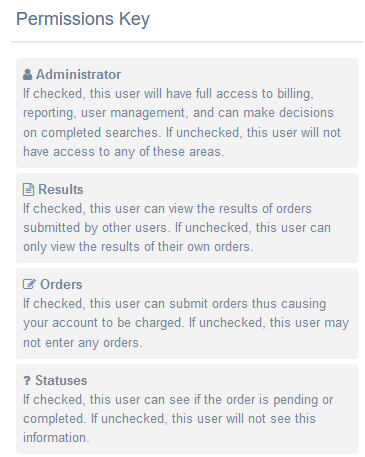
The available permissions include:
Requests: Place new orders
and/or:
Results: See results of completed searches
and/or:
Statuses: See if order is pending or complete
and/or:
Admin: Can make a decision on completed searches and add/remove users on the account
Was this article helpful?
That’s Great!
Thank you for your feedback
Sorry! We couldn't be helpful
Thank you for your feedback
Feedback sent
We appreciate your effort and will try to fix the article