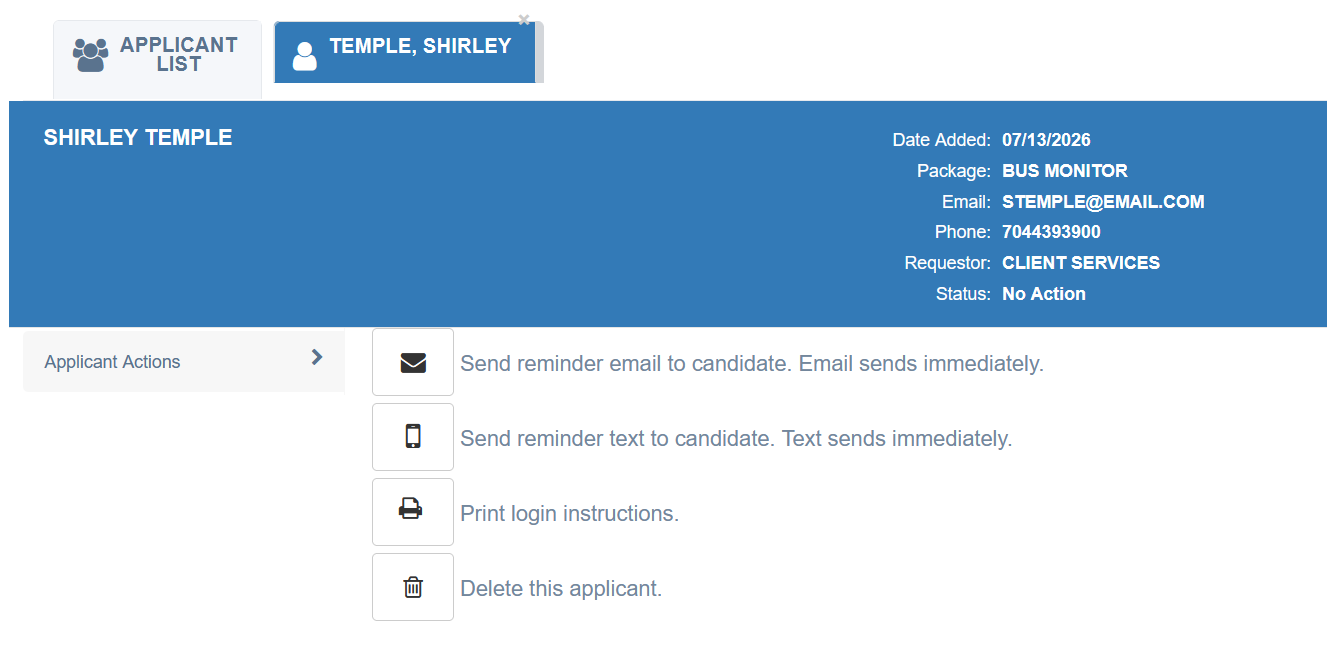
To manage a pending Applicant Express request, navigate to Applicant Express in the left navigation panel of Aegis to view your pending requests. Click on an applicant's name to access the following actions:
| Icon | Action |
|---|---|
| ✉ Envelope | Send a reminder email to the applicant. The email sends immediately. |
| ☎ Phone | Send a reminder text message to the applicant. The text sends immediately. |
| Printer | Print the applicant's login instructions. |
| Trash | Delete the applicant request if it is no longer needed. |
Note: The text message reminder option will only appear if a phone number was provided when the request was originally created.
⚠️ Important: Applicant Express credentials are only valid for 10 days. If the credentials have expired, you may send a reminder email to the candidate to renew their credentials, or delete the request if you no longer wish to proceed with this applicant.
Was this article helpful?
That’s Great!
Thank you for your feedback
Sorry! We couldn't be helpful
Thank you for your feedback
Feedback sent
We appreciate your effort and will try to fix the article